
Sinner Mix - Kiss Music Box
Jingmao TecMusic
4.268.00 Reviews
- Version
- 1.1.13
- Installs
- 1.00M
- Age Rating
- Teen
Screenshots

Our Review of Sinner Mix - Kiss Music Box
 Analysis by Appyee
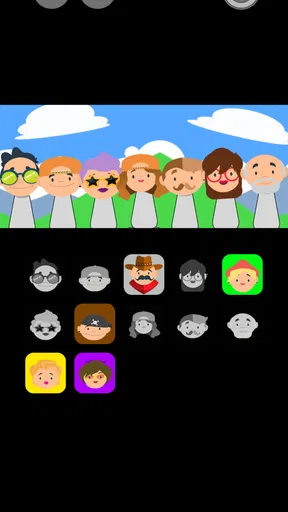
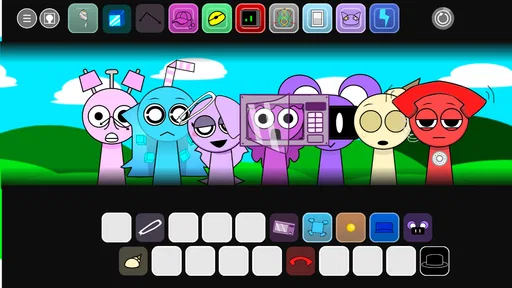
I approached Sinner Mix - Kiss Music Box as a small music game that could easily end up on a shared household phone. Its basic idea is simple: choose a character and play music, but that simplicity is also what defines the experience. I found it more suitable for short, casual sessions than for someone looking for a deep rhythm system, a long campaign, or a serious music-learning tool.
The game is listed in the music category, comes from Jingmao Tec, and is free to install. Its store summary gives away the central interaction without explaining much more, so the real question is whether that focused format works for your routine. In my experience, it works best when several people want to take quick turns, compare character choices, or fill a few quiet minutes without committing to a larger game.
How Sinner Mix works on a shared device
The shared-device angle is where this game makes the most sense. Imagine a phone or tablet sitting in the living room while one person is waiting for dinner, another wants to try the music, and somebody else is looking for a quick distraction. Because the premise is immediately understandable, a new player does not need a long explanation before taking a turn.
I would hand it to a child, teenager, or casual player with a simple instruction: choose a character, explore the music interaction, and pass the device when you are done. That makes it less demanding than a traditional rhythm game that expects everyone to understand lanes, timing windows, song lists, or progression systems before the first satisfying moment.
There is a useful distinction here between shared play and shared ownership. The game can be passed around, but that does not automatically mean that every player has a separate identity or private progress space. I would not treat one installation as a collection of individual profiles unless the game itself visibly provides that option. For a household, the safest expectation is a casual turn-taking experience rather than a fully separated family account system.
That limitation matters if several people care about personal records or unlocks. A younger player may not mind, while an older player may want a clear sense of what belongs to them. Before making it part of a regular family routine, I would spend a few minutes checking how the current session behaves when another person takes over. That small check prevents arguments over whose choices or progress are being used.
Why the short-session format is useful
I like this kind of focused design for moments when a full game feels excessive. It can work during a short break, while travelling with a device available, or when two people want an informal activity rather than a competitive match. The character choice gives the handoff a natural starting point: one person picks a character, plays for a while, and the next person makes a different choice.
The same simplicity can become repetitive if you play alone for a long stretch. There is no reason to expect the character selection alone to provide the depth of a complete music game. If your goal is to improve timing, master difficult tracks, or build a large personal collection, a dedicated rhythm title will probably offer a stronger long-term structure.
For me, the best use is not “this replaces every music game.” It is “this gives a household a low-pressure musical toy that can be understood quickly.” That is a narrower promise, but it is also a more realistic one.
Setting boundaries before passing the phone around
On a shared device, I would establish a simple order before opening the game. Decide who starts, agree on how long each turn lasts, and avoid changing device settings in the middle of play. These are ordinary household rules, but they matter more when a game is designed for quick experimentation rather than formal multiplayer sessions.
I would also keep the game separate from important personal tasks. If the same phone is used for messages, work, school, or banking, pass it only when the owner is comfortable with that. A game can be harmless while the device itself still contains private information. The practical boundary is not created by the music theme; it comes from how the household handles the phone.
Another useful habit is to ask players not to assume that a character choice creates a private save area. If someone wants a personal record, write down the result or use a separate device when appropriate. That may sound overly cautious for a casual game, but it makes expectations clear and avoids treating a shared screen as if it were a multi-account platform.
Because the game is free, it is easy to install casually and leave available for anyone in the home. I still prefer an intentional setup: decide who may use it, where the device stays, and whether younger players may open it without asking. Free does not mean every household will want the same access routine.
Coordinating turns without making the game feel like homework
The strongest household routine is probably a lightweight one. I would let each player choose a character before starting, then give everyone one uninterrupted turn. The point is to keep the activity moving, not to create a tournament around a game built for quick access.
If several players are using the same screen, watch for the difference between observing and interrupting. Music games invite people to tap along or suggest a different choice, but too many hands around one device can make the experience frustrating. A clear “watch first, play on your turn” rule keeps the game friendly, especially with younger children.
There is also a coordination benefit in letting players explain their own choices. One person may choose a character because of the visual style, while another may care more about how the music feels. That conversation gives the game more social value than simply passing the phone silently. It turns a very small interaction into a shared activity without pretending that the game has a built-in family mode.
For a parent or caregiver, I would avoid promising a structured educational outcome. Choosing a character and interacting with music can be engaging, but that is not the same as formal musical practice. If a child wants to learn rhythm, instruments, or composition, a dedicated learning app or instrument will be a better fit. This game is more useful as an approachable introduction to playful music interaction.
Age context and household trust
The content rating is Teen, so I would not automatically place it in the hands of very young children without first looking at the actual presentation on the device. The rating gives a household a useful starting point, but age suitability is still personal. A parent may be comfortable with the theme and visuals, while another may prefer to preview any character-based game before allowing independent use.
That preview is especially sensible when the game is installed on a child’s shared tablet. I would check the opening flow, the way characters are presented, and whether the child understands when the game is active. This is not about assuming a problem; it is about matching the experience to the child rather than relying on the word “music” to describe the whole tone.
Trust also includes device handling. If a child is borrowing an adult’s phone, explain that the game is for play only and that other apps are off limits. If several siblings share a tablet, agree on where it is kept after the session. These boundaries are more valuable than pretending the game itself manages household behavior.
I would be particularly careful with unsupervised access if the device is used by people of very different ages. A teenager may understand the rating and the difference between a game screen and a system setting; a younger child may simply tap whatever appears next. The right choice depends on the child, the device, and the household’s normal rules.
What the current release means for practical use
The game’s current version is 1.1.13, and it supports devices running Android 7.0 or later. That gives it a relatively broad compatibility range for Android households, including older devices that are no longer suitable for some newer games. I would still test it on the exact shared device before planning a group activity, because compatibility on paper does not tell me how comfortable the controls or presentation will feel on a particular screen.
It was released on December 24, 2024, so I see it as a fairly recent option rather than a long-established music classic. That makes it worth checking after installation for how the current build behaves in your household routine. If the app changes over time, a shared-device owner should also remember that everyone may experience the same installation after an update.
The game has reached over a million installs and holds a 4.2 average from around five thousand ratings. Those figures suggest that the concept has attracted a substantial audience, but they do not tell me whether it will suit every family. A popular, lightweight game can still be the wrong choice for someone who wants detailed control, offline certainty, or strong separation between players.
There are also around sixty reviews listed, which is a much smaller body of written feedback than the rating count might imply. I would therefore treat broad impressions with some caution and judge the game directly on the device that will actually be shared. For a simple title, that hands-on check is more useful than assuming that a rounded average captures every household experience.
Where it stands beside ordinary music-game alternatives
Compared with a conventional rhythm game, this title appears more approachable because the central action begins with character choice rather than a demanding performance challenge. That makes it better for casual guests, younger teenagers who are curious, and adults who do not normally play music games.
Compared with a music-learning app, it is less appropriate for measurable practice. Someone looking for lessons, notation, instrument technique, or a planned curriculum should choose a tool designed around those goals. The appeal here is the playful connection between a character and music, not a substitute for instruction.
Compared with streaming music, it offers interaction instead of passive listening. That can make it a better choice when two people want to do something together, but streaming remains the better option for uninterrupted background music or a carefully chosen playlist. I would not install this expecting it to function as a music player.
Compared with a larger console or mobile game, it asks for less time and probably less commitment. That is a strength in a busy household, but it also means the experience may not satisfy players who want extensive progression. The trade-off is clear: quick access and easy handoffs in exchange for a narrower play loop.
Who should install it, and who should skip it
I would recommend trying it if you want a free music-themed game that several people can understand without a tutorial-heavy introduction. It is especially appealing when the device is shared, the sessions need to stay short, and the household enjoys discussing character choices rather than chasing complex scores.
I would skip it if your main goal is serious rhythm training, competitive depth, private player progression, or a dependable replacement for a music library. I would also pause before installing it for a young child because the Teen rating deserves an adult’s judgment, even though the central idea sounds light.
Players who dislike repeating simple interactions may lose interest quickly. The game’s focused premise is its advantage for casual use, but that same focus can feel limited when you want a wider range of activities. I would start with a short trial rather than presenting it as the household’s main game.
One practical tip is to use it as a transition activity. A child can have a brief turn while waiting for an appointment, or siblings can play before moving on to another task. Keeping the session bounded preserves the novelty and makes it easier to stop. A second tip is to rotate the person who chooses first, since the opening choice can otherwise become an unnecessary source of disagreement.
A third tip is to treat the installation as device-specific. If one phone belongs to an adult and another tablet is shared, put the game where the household’s rules are clearest. That reduces accidental access to private apps and makes the game easier to include in a supervised routine.
My household verdict
After looking at it as both a music game and a shared-device activity, I see Sinner Mix - Kiss Music Box as a modest but approachable option. Its value comes from being easy to pass around, quick to explain, and different enough from passive music listening to create a small social moment.
I would recommend it to a household that understands its limits: no assumptions about separate family profiles, no promise of formal music education, and no expectation of the depth found in a major rhythm game. The free price makes experimentation easy, while the Teen rating means adults should make the final call for younger users.
My final advice is to install it when you want a casual character-and-music experience, then test one shared session with clear turn-taking. If everyone enjoys the simple interaction, it can earn a place on a common device. If the household needs private progress, advanced musical practice, or longer-term challenge, another category of app will serve you better.
Verdict
Strengths of Sinner Mix - Kiss Music Box
- Creates a relaxing atmosphere with soft, romantic Kiss-inspired melodies.
- Simple controls make it easy to start, pause, and switch between tracks.
- Useful as background music while reading, studying, or winding down.
- Lightweight interface is accessible for casual listeners of any age.
- Offers a nostalgic way to enjoy familiar Kiss songs in a music-box style.
Limitations of Sinner Mix - Kiss Music Box
- The music-box arrangements may feel repetitive during longer listening sessions.
- Some listeners may prefer the original Kiss recordings over these softer versions.
- Track selection could feel limited for users seeking a broader Kiss catalog.
- Audio quality may not satisfy users accustomed to high-resolution music apps.
- The app’s appeal is quite specific and may not suit non-Kiss fans.
Other Releases by Jingmao Tec
View All
FunTime Mix
Music3.4
Similar Picks in This Category
View All
Tiles Hop Music & Ball Game
AMANOTES PTE. LTD.4.3

Magic Tiles 3™ - Piano Game
AMANOTES PTE. LTD.4.6

Real Piano
Bilkon3.7

Piano Game: Classic Music Song
Dream Tiles Piano Game Studio4.0

Smash Colors: Music Ball Rush
BADSNOWBALL HONGKONG LIMITED4.2

Piano Music Go-EDM Piano Games
Joy Journey Music Games4.5
Frequently Asked Questions
What is Sinner Mix - Kiss Music Box?
Sinner Mix - Kiss Music Box is a music-focused mobile app built around the Kiss Music Box experience. It is designed for listeners who enjoy playing romantic or relaxing tracks in a simple, easy-to-use interface. Before downloading, keep in mind that the available songs, features, and overall experience may depend on the app version, your device, and the developer’s current content licensing or update policy.
Is Sinner Mix - Kiss Music Box free to download and use?
The application may be available as a free download, but users should check the store listing carefully for advertising, optional purchases, subscriptions, or feature limitations. Free access does not always mean that every part of the app is unrestricted. We recommend reviewing the price section, in-app purchase information, and recent user reviews before installing, especially if the app will be used by children or on a shared device.
Does Sinner Mix - Kiss Music Box require an internet connection?
Whether an internet connection is needed can vary according to how the app delivers its music and media. Streaming, advertisements, account features, and content updates commonly require Wi-Fi or mobile data, while offline playback is only possible if the application explicitly provides downloads or cached content. Check the app’s description and permissions before relying on it during travel or in areas with limited connectivity.
Is Sinner Mix - Kiss Music Box safe and compatible with my device?
For a safer installation, download Sinner Mix - Kiss Music Box only through the official Google Play Store or Apple App Store, and verify the developer name, ratings, update history, and requested permissions. Compatibility depends on your Android or iOS version, available storage, and device performance. Avoid modified APK files or unofficial download pages, since they may contain unwanted software or expose personal information.
What should I know about privacy and permissions before installing it?
Before using Sinner Mix - Kiss Music Box, read its privacy information and review the permissions requested during installation. A music app may request access related to notifications, audio playback, storage, or network connectivity, but permissions should be relevant to its functions. If the app asks for access that seems unnecessary, consider denying it or choosing another application with clearer privacy practices and more transparent data handling.
Play our best games!


